.svg)
Key Takeaways
- The industry average for subcontractor payment is 96 days from invoice to payment — more than three months of floating payroll and overhead.
- 75% of subcontractors have dipped into retirement savings to meet overhead costs due to slow construction payments.
- Siteline's reporting suite includes collections tracking, cash flow forecasts, and project health scoring to give finance teams real-time financial visibility.
- Proactive financial reporting helps subcontractors identify overdue invoices, underbilled projects, and cash flow gaps before they become crises.
Commercial construction payments aren’t just slow—they’re glacial. The new industry average for subcontractors is 96 days from invoice to payment. That’s more than three months of floating payroll, vendor bills, and overhead before money hits your account. To offset this gap in cash flow, more and more subcontractors (75%, to be exact) are dipping into their retirement savings to meet overhead costs.
Why so long? Unlike most industries that run on net-30 payment terms, construction payments come with extra layers of complexity. They’re tied to project milestones, retention, and change orders—and every job seems to have its own invoicing hurdles, from custom forms to specific GC portals.
In other words, subcontractor cash flow is always under pressure, and visibility into where your money is being made and lost is imperative to running a successful business.
That’s where accounts receivable (A/R) reporting comes in. Done right, it gives you a clear view of the money owed to you, when you can expect it, and where you can take action to get paid faster. The challenge is getting accurate, timely data in a format you can actually use—which is why we built Siteline’s reporting suite.
Getting to Know Siteline’s Reporting Suite
Each of our six reports was designed to answer the questions subcontractors ask every day: Where’s our cash? Who owes us? Are we billing what we planned? And more importantly—what can we do about it?
Here’s a breakdown of each—what they show, who benefits most from them, and how they help subcontractors bill faster and collect sooner.
1. Overview Report: Your High-Level Check-In
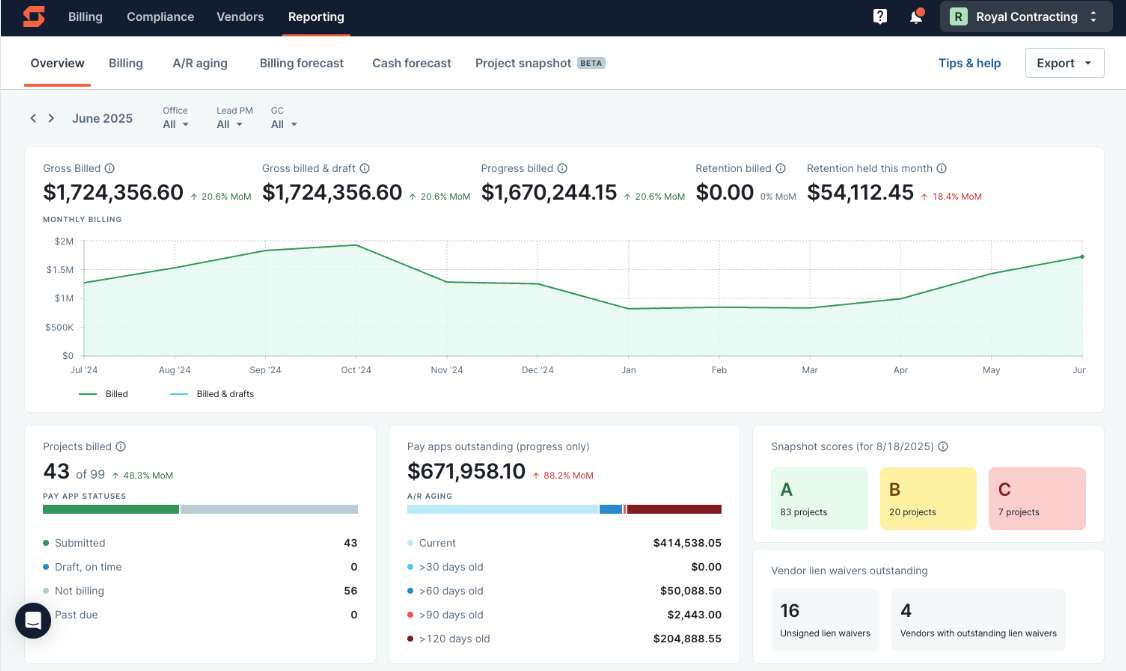
The Overview Report gives you a real-time look across all jobs—billed this month, not billed, retention held, and any open items like missing lien waivers.
Why It Matters
This is the first thing you’ll encounter when you click on our Reporting module. It’s essentially your “current month command center.” You’ll see which projects are on track and which ones need immediate attention before the month-end.
What You Can Do With It
- Keep billing consistent across teams and offices by spotting discrepancies or missed work early.
- Catch compliance gaps, like missing lien waivers, before they delay payment.
- Make sure every active job is billed and pay apps are submitted on time.
Questions It Can Answer
2. Billing Report: Your Operational Control Panel
Siteline’s Billing Report shows the operational status of billing per job, including billed-to-date vs. contract, balance to finish, and retainage.

Why It Matters
This report gives finance, ops, and field teams instant visibility into where every job stands in the billing cycle, eliminating last-minute surprises and missed deadlines. It also shows various project manager (PM) performance indicators, like:
- who’s consistently meeting billing deadlines (and who isn’t),
- how much is still in draft, and
- who’s best at documenting and processing change orders.
Questions It Can Answer
3. A/R Aging Report: Your Client and Collections Tracker
Our A/R Aging report shows you outstanding balances in 30/60/90/120+ day buckets, gives you real-time visibility into each invoice, and enables tighter collaboration internally via comment threads, tags, and escalation tracking.

Why It Matters
This report helps you prioritize collections, spot chronic late payers, and track invoice progress in real time. By seeing who owes you money—and how long they’ve owed it—you can focus your A/R escalations efforts where they’ll have the biggest impact, reducing the risk of cash flow crunches.
Questions It Can Answer
4. Billing Forecast Report: Your Forward-Looking Revenue Map
The Billing Forecast Report shows expected monthly billing—historical and forecasted—with backlog insight to help plan resources and cash flow.

Why It Matters
Billing forecasts are essential planning tools for any business. For subcontractors, it helps align staffing, equipment, and investments with upcoming workload, while identifying underbilling and scheduling gaps before they cause trouble.
Questions It Can Answer
5. Time to Payment Dashboard: Your Cash Conversion Tracker
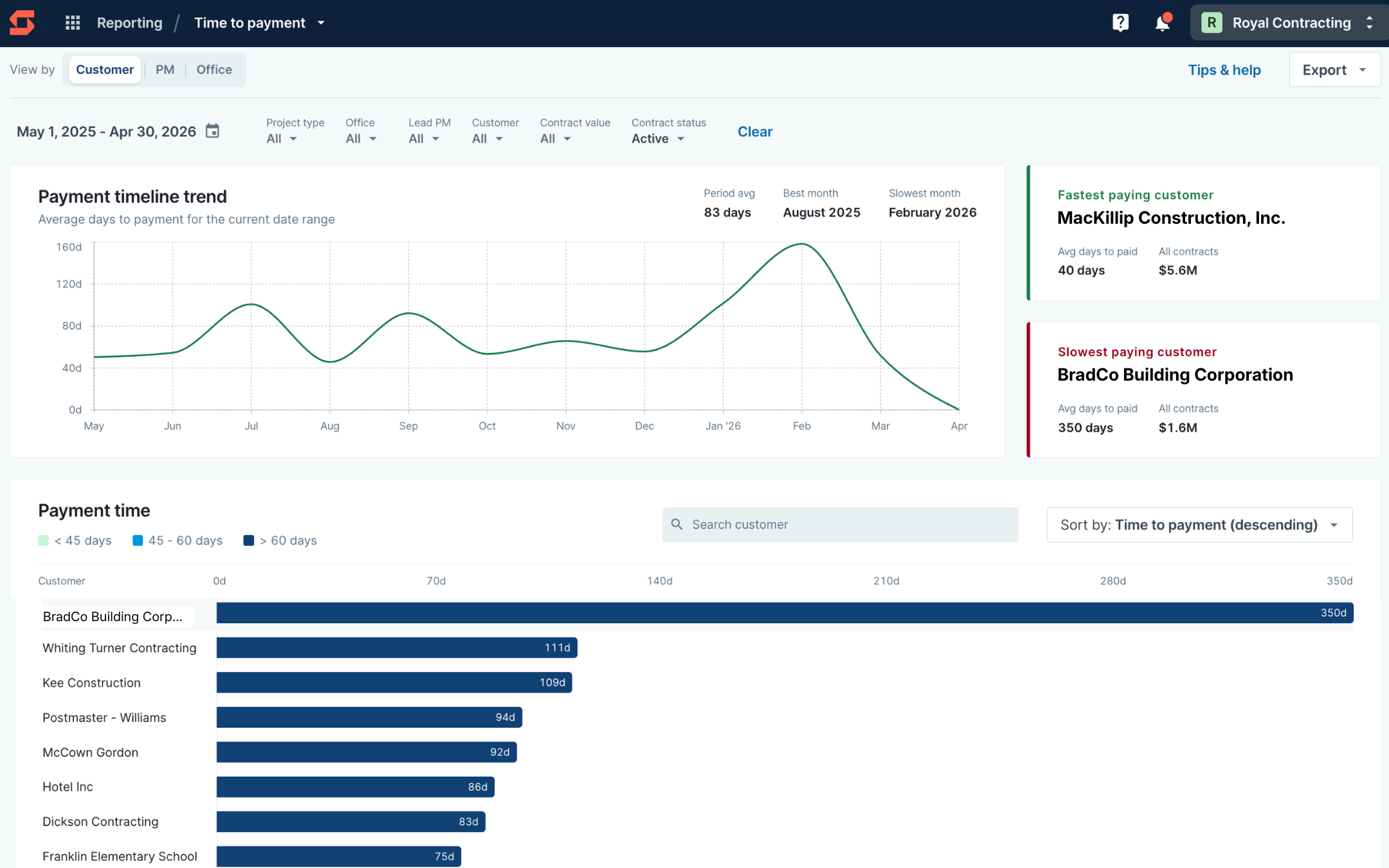
The Time to Payment Dashboard shows how long it actually takes to turn billing into cash across customers, PMs, and offices. It highlights average days to payment, surfaces fastest and slowest payers, and shows payment timing trends over time so teams can spot where cash conversion is improving or slipping.
Why It Matters
Knowing what is overdue is important. Knowing how long it typically takes to get paid is even more so. Time to Payment helps subcontractors move beyond static aging buckets and understand real payment behavior across the business.
Questions It Can Answer
6. Cash Forecast Report: Your Cash Flow Runway
Siteline’s cash forecast report predicts payment timing for each pay app, using historical trends, GC behavior, and contract terms.

Why It Matters
Contract terms may say one thing, but actual payment timing can tell a different story. This report gives you a clear view of when cash will really arrive, so you can line up inflows with outgoing expenses and focus collections efforts where needed.
Questions It Can Answer
7. Project Snapshot: Your Job Health Dashboard
Our newest report, Project Snapshot, pulls together key financial signals—like cash position, costs to date, pending change orders, collections activity, and more—to assign each project a health grade (A, B, or C).

Why It Matters
It’s like a mini WIP report, and it’s always up to date. By grading projects and showing what’s driving the score, you can quickly spot at-risk jobs and catch other issues before they become cash flow problems.
Questions It Can Answer
Seeing the Full Picture Changes Everything
In an industry where it can take three months or longer to get paid, you can’t afford to fly blind. The right reports don’t just tell you where your money stands; they can help you act faster, smarter, and with more confidence.
Siteline’s reporting suite was built for subcontractors to take control of their billing and collections—from spotting at-risk projects before they spiral, to forecasting cash with great precision, to targeting fast-paying clients.
Better visibility compounds over time. Siteline customers improve payment speed by 5.3 days after the first 6 months, 9 days in year two, and 14.6 days by year three—as billing processes become more consistent and teams can act faster on what the data shows.
Ultimately, reporting is just one piece of the Siteline puzzle. If you’re interested in seeing how our software can streamline your billing process and reduce DSO by 30%, book a demo with us here.

AIA®, G702®, and G703® are registered trademarks owned by The American Institute of Architects and ACD Operations, LLC. Siteline is not affiliated with The American Institute of Architects or ACD Operations, LLC. Users who wish to use Siteline’s software to assist in filling out AIA® forms must have or secure the AIA® forms. Siteline does not and will not provide users with the forms.


%202.webp)