.svg)
Key Takeaways
- The construction industry loses $280 billion annually in revenue due to slow payment processes, per Rabbet's 2024 Construction Payments Report.
- Subcontractors wait an average of 96 days to get paid, but billing errors and manual processes extend that timeline further.
- Seven common billing roadblocks — including manual errors, missing lien waivers, and non-standard GC forms — each add weeks to payment cycles.
- Subcontractors cannot control when GCs release payment, but they can control how quickly and accurately they submit pay applications.
The construction industry loses $280B annually in revenue due to slow payment processes, per Rabbet’s 2024 Construction Payments Report. That’s not only a general contractor (GC) problem; it’s an industry-wide crisis that’s impacting every subcontractor’s bottom line.
You might be thinking, “But we get paid when the GC pays us. What control do we have over that?” More than you realize. While subcontractors can’t control when GCs release payments, they can control how efficiently they submit pay apps and how quickly they address any issues along the way.
However, the traditional, spreadsheet-based approach to billing cannot keep pace with today’s construction project demands. It’s turned billing into a maze of disconnected steps, making it harder to get paid on time and keep projects moving.
The Payment Waiting Game
Getting paid in construction is ridiculously challenging and drawn-out, especially for subcontractors. Despite paying for all labor and materials upfront, they sit at the back of the construction payment chain, waiting their turn.
Here's how it works each month:
Step 1: Subcontractors compile detailed payment applications for work already completed, including various compliance documents and contractor-specific requirements.
Step 2: After submitting the pay app to the GC, subcontractors wait for the project owner or developer to disperse payment to the GC.
Step 3: Once the GC gets paid, they review payment applications and—if everything checks out—disperse payments to subcontractors and vendors.
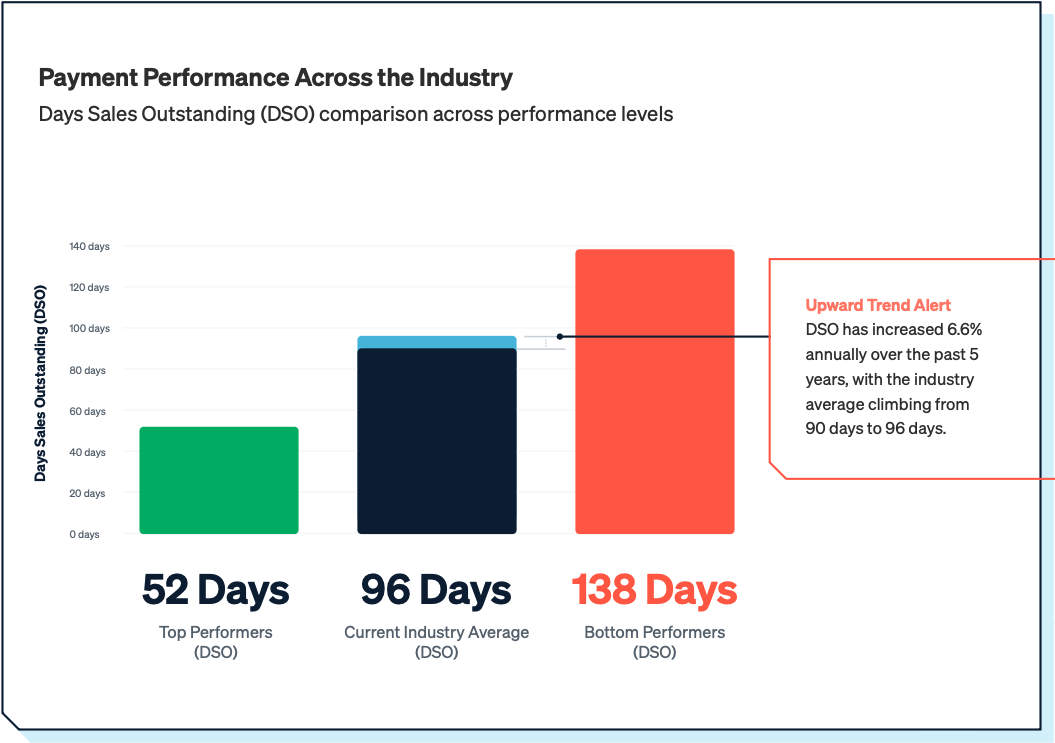
Subcontractors largely manage this process on spreadsheets, which is part of the reason why only 5% of subcontractors report receiving payments on time. In reality, most subcontractors wait about 96 days to get paid for work they've already completed. Across nearly $14B in tracked receivables, Siteline customers collect payment in an average of 55 days—a 41-day difference. (Want to dig into DSO trends further? Check our State of Subcontractor Billing in 2025 report.)
What Slows You Down
Here’s where we see outdated billing methods start to break down and slow cash flow:
1. Manual Errors
The manual nature of subcontractor billing creates errors and delays that ripple through your entire A/R process. Critical documents get lost in the shuffle, data entry mistakes are a norm, Excel formulas keep breaking—it all leads to pay app issues that force teams into crisis mode to fix and resubmit. By the time that’s done, you might have missed the draw, pushing your hard-earned payment out weeks or months.
2. Endless Paper Chasing
A huge contributor to billing errors is the lack of a centralized system. When your Schedule of Values (SOV) lives in one spreadsheet, your change orders in another, and material receipts in a different system altogether, it makes an already tedious process even more difficult. Plus, these critical documents are often in possession of different people, so getting updated information each month becomes a constant game of phone tag and email chains. It’s a huge time suck.
Take it from VanKirk Electric: their previous billing process took up so much time that collections and growth initiatives were falling to the wayside. After implementing Siteline, they reclaimed 60 hours every month—time they’ve since been able to reallocate to higher-value tasks.
3. Change Order Mishaps
Change orders are one of the trickiest parts of any construction job. They can either boost or drain your profits depending on how well you manage them. As we just covered, tracking these across disconnected systems is already a nightmare. But when changes don’t get communicated from the field to the back office—or get overlooked entirely—all that extra work goes unbilled and throws off your forecasting.
Here’s why this matters more than ever: change orders on existing projects are expected to increase once tariffs take effect. Getting this process right will be super critical to preserving your margins in the coming months. Luckily, we’ve got a very beefy, very informative change order guide that can help.
4. Lien Waiver Issues
Lien waiver mistakes are one of the top reasons for billing issues and rejections. It’s because there’s a lot when it comes to managing them:
- Use the wrong waiver form (these vary by GC and state)? Rejected
- Submit the wrong type at the wrong time? Rejected
- Forget to collect waivers from your lower tiers? Rejected
- Fail to match the waiver amount to the pay app? Rejected
You also have to keep your state’s lien waiver requirements straight. Some states require lien waivers to be notarized; some require that you use a specific font size (I don’t want to point fingers, but Georgia, it’s you); some have strict regulations around whether you can even use unconditional waivers and when you can sign them. (Don’t worry, you can look up your state’s lien waiver laws in our directory here.)
Beyond reviewing the contract and your state’s requirements, having an intuitive system for tracking and submitting lien waivers can prevent a lot of headaches and keep your cash flowing.
5. Forgetting Certified Payroll
For subcontractors working on prevailing wage projects, certified payroll reporting adds another layer of complexity to track. If submissions get rejected due to certified payroll mistakes, the typical correction cycle can take two to six weeks, depending on the agency’s review process and the complexity of the required fixes.
During these delays, your cash flow suffers while your team spends hours reconstructing timesheets, hunting down missing information, and coordinating with superintendents to verify worker classifications.
This is where specialized tools like eBacon become invaluable. They streamline certified payroll management in one centralized system, ensuring compliance while keeping your entire A/R process moving smoothly (and preventing those costly rejection cycles).
6. Visibility Gaps
Working from spreadsheets means flying blind when it comes to your A/R performance. You know you’re owed money, but you can’t quickly surmise which projects are falling behind, which GCs are consistently slow payers, and what payments have been sitting out there for weeks.
Without clear insights into your billing and collections data, building reliable cash flow forecasts becomes nearly impossible. And when you can’t predict when money’s coming in, everything else gets harder—managing payroll, timing equipment purchases, refining your bid strategy, coordinating staffing levels.
Even just having filterable A/R reports at your disposal can help you analyze your project managers’ performance. You can see who’s consistently getting their billing submitted on time, who has the fastest change order turnarounds, and who might need some extra support in these areas. It’s a win-win that helps with both cash flow and team development.
7. Ineffective Billing Follow-Ups
Let’s continue down this vein. A lot of subcontractors make the mistake of thinking their job is done once they hit "send" on a pay app. But without a systematic way to track what happens after submission, you're stuck with reactive follow-up tactics: random phone calls and emails asking, "did you get my invoice?"
This approach treats follow-up as separate from billing, when it should be built right into your workflow. When you can see exactly where each pay app stands in the approval process—as is the case with Siteline—you can establish clear follow-up triggers and assign ownership at each step.
Here are a couple of quick examples of A/R escalation plans from the subs we work with:
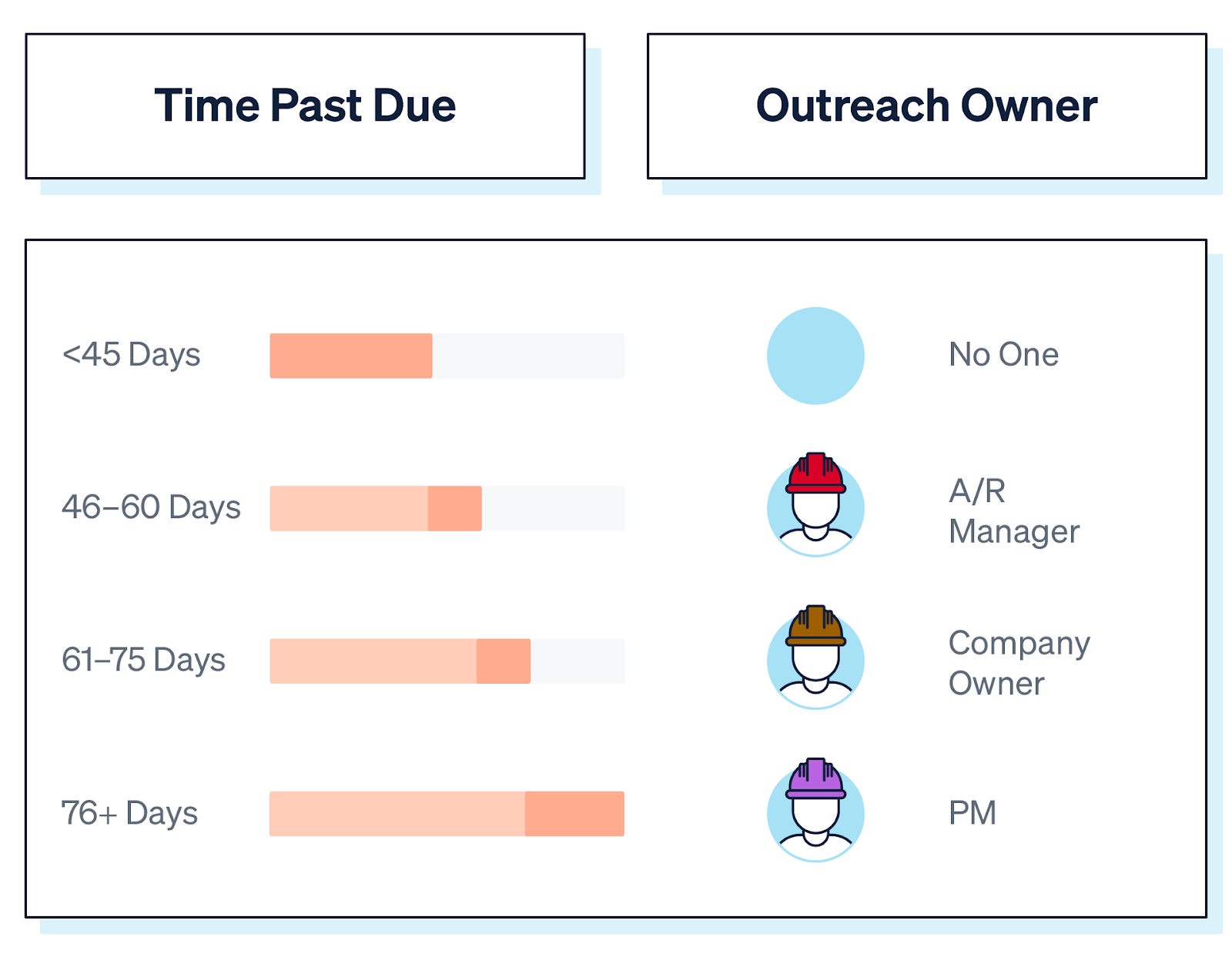

You can see they’re pretty straightforward. The key is having a system that makes it easy to stay consistent. Check out our A/R escalation blog post for more deets.
8. Dependency Risks
More often than not, billing knowledge naturally ends up concentrated in one person’s head. And when that person goes on vacation or leaves the company, suddenly no one knows which GCs require notarized pay apps, where the latest change orders are stored, or how to navigate that one client’s quirky portal requirements.
These knowledge siloes become a serious liability as your company grows. What works for managing five jobs monthly doesn’t scale when you’re handling 15. And when one person owns the billing process, it’s hard to step in, bring others up to speed, or scale without things slipping through the cracks.
Breaking Free from the Billing Maze
If any of these scenarios sound familiar, you’re not the only one. Every roadblock we mentioned stems from the simple fact that manual, disconnected billing processes can’t handle the demands of today’s construction complexities.
That’s exactly why we built Siteline—to help subcontractors digitize workflows that hold them back and their payments at bay. Siteline replaces spreadsheets with a centralized solution that streamlines billing, handling everything from custom pay apps and lien waiver management to change order tracking and cash flow forecasting. One of the biggest perks is that everyone involved in billing can use Siteline, making it easier to stay aligned and share the workload.
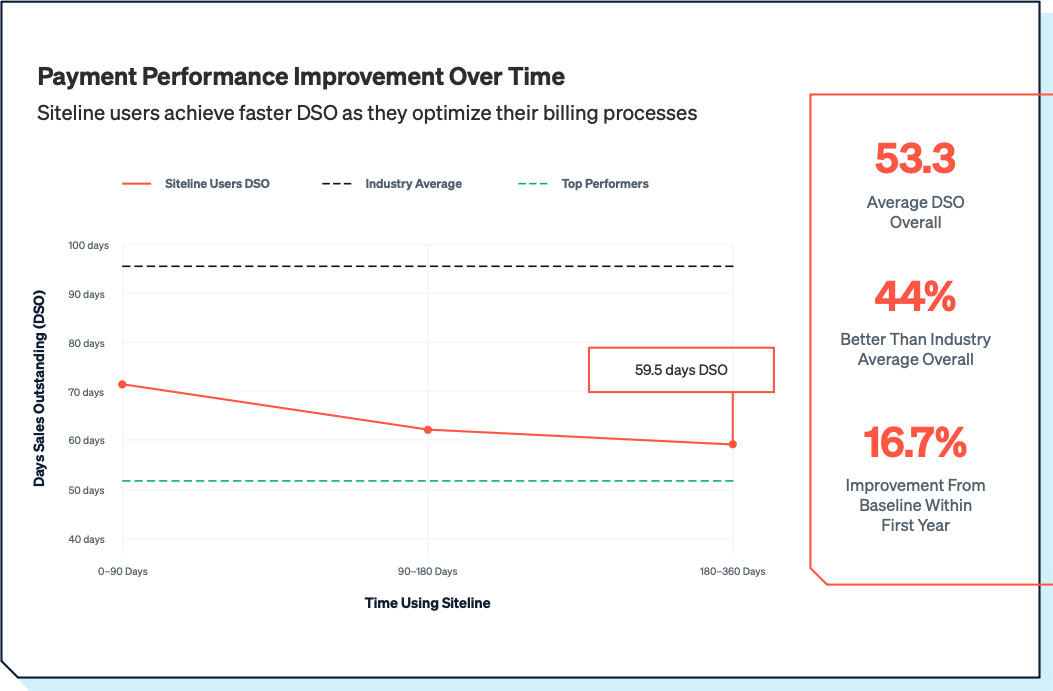
The results speak for themselves: According to our State of Subcontractor Billing in 2025 report, Siteline users are getting paid in just 53.3 days, compared to the current industry average of 96 days. That's 44% faster cash flow.
Forward-thinking subcontractors are digitizing more than just A/R. They’re building tech stacks that improve billing, compliance, payroll, and beyond. Choosing the right tools and making sure they work well together is key.
Our software selection guide breaks down how to evaluate what fits where. For example, Siteline streamlines payment applications and A/R, while tools like eBacon handle certified payroll and prevailing wage compliance. Together, they help teams move faster and stay ahead.
Learn more about how Siteline can transform your billing workflow, and discover how eBacon can streamline your certified payroll requirements to keep your entire A/R process moving efficiently.
AIA®, G702®, and G703® are registered trademarks owned by The American Institute of Architects and ACD Operations, LLC. Siteline is not affiliated with The American Institute of Architects or ACD Operations, LLC. Users who wish to use Siteline’s software to assist in filling out AIA® forms must have or secure the AIA® forms. Siteline does not and will not provide users with the forms.


%202.webp)