.svg)
Key Takeaways
- Change orders are a leading cause of project cash flow disruption, per a 2022 industry study, yet most finance teams treat them as paperwork rather than financial signals.
- Pending change order dollar value is a key KPI — it represents revenue at risk that affects cash forecasts, bonding conversations, and confidence in project profitability.
- Five change order KPIs — approval rate, cycle time, billing lag, and pending dollar value — give finance teams visibility to prevent cash flow from quietly slipping.
- Change order billing delays — work completed but not invoiced due to pending approvals — are among the most underreported sources of cash flow gaps for subcontractors.
Change orders are supposed to be pure upside—work that keeps projects moving and yields extra revenue. In reality, they are one of the easiest ways cash flow can quietly slip.
This isn’t because change orders are bad, it’s because they’re easy to lose visibility on. Work gets done. Approvals lag. Billing gets delayed. Then, finance is left explaining why cash flow does not line up with what the field expected.
I hear the same pattern over and over: teams treat change orders as paperwork, not as financial signals.
The Impact of Overlooked Change Orders
A large 2022 industry from the American Institute of Architects found that across thousands of construction projects:
- Change orders added about 4–5% to total project cost on average
- Schedule impact from change orders averaged around 1% of project duration, depending on project size
That sounds modest, but it’s only part of the story.
We recently aggregated Siteline data across all customer contracts from 2025 and found that change orders account for roughly 26% of total contract value.
In other words, while change orders may only nudge total project cost by a few percentage points, they make up a material share of the revenue subcontractors actually have to manage, approve, bill, and collect.
That gap—between the industry’s 4-5% cost impact and the 26% of revenue subs actually manage through change orders—is where risk creeps in.
So, which KPIs actually help you manage that exposure? Here are five that connect change orders directly to cash flow, risk, and project performance. If you track these consistently, you can spot issues earlier and avoid the month-end surprises no one enjoys.
KPI #1: Age of Unapproved Change Orders
What it measures: How long submitted change orders sit without approval.
Why it matters: Cash flow problems usually start here. Costs hit right away, but revenue does not. So the longer change orders sit unapproved, the more risk you carry. At some point, they stop feeling like backlog and start feeling like disputes. This is also the metric finance teams usually notice after a job already feels off, not before.
Who monitors this and when: Project managers should check this weekly, with finance leaders watching closely.
What good looks like: Most change orders move through approval within a few weeks. Once approvals start stretching beyond a month, they deserve closer attention.
How Siteline helps: Our Project Snapshot flags unapproved change order requests and grades them by age (A: ≤14 days, B: 15–30, C: >30), so teams don’t have to “feel” the delay; they can actually see it before it becomes a problem.

KPI #2: Pending Change Order Dollar Value
What it measures: The total dollar value of change orders that are not approved or fully executed.
Why it matters: Consider this your revenue-at-risk number. It affects cash forecasts, bonding conversations, and confidence in the job. On paper, this might just look like backlog. In reality, it’s often cash you are already floating.
Who monitors this and when: Finance leaders, project managers, and executives should track this weekly on active jobs, and monthly during WIP.
What good looks like: Low and trending down over time as approvals and billing catch up.
How Siteline helps: Project Snapshot shows you pending change order dollars alongside your billing and collections status, so everyone—finance and ops—are looking at the same numbers rather than three separate spreadsheets (and three different definitions of “at risk”).
KPI #3: Change Order Aging Across Full Lifecycle
What it measures: How long change orders take to move from identification → approval → billing → payment.
Why it matters: You can be fast at approvals but slow at billing, or the other way around. Lifecycle aging shows you where things actually break down, tying change orders directly to working capital.
Who monitors this and when: Finance teams, project managers, and project executives should track this monthly (at a minimum) and weekly on larger or higher-risk jobs.
What good looks like: Change orders moving steadily through each stage without long pauses in between.
How Siteline helps: True to its name, Project Snapshot gives you a weekly snapshot of which change orders are aging out. Then, you can drill into the project’s full Change Order Log to investigate. For a view across all jobs, export the Pending COs report—it breaks down every change order not yet added to your Schedule of Values (SOV).
KPI #4: Change Orders as Percentage of Contract Value
What it measures: Total approved change order value divided by the original contract value.
Why it matters: This is the headline number executives care about. It explains why the job doesn’t look like the original forecast and helps identify patterns across clients and project types.
Who monitors this and when: Finance leaders, executives, and project managers should monitor this on a monthly basis, and again at project closeout.
What good looks like: Context matters here. As I mentioned earlier, while industry data shows change orders add around 4-5% to overall project costs, subcontractors typically manage around 26% of contract value through change orders. This means the exposure is actually much larger than headline numbers suggest.
So what’s a healthy percentage for your jobs? It depends on project type and client, but higher percentages are not automatically bad. They do signal more complexity, timing risk, and a greater need for disciplined approval and billing workflows.
The key is tracking the trend: are percentages consistent and predictable, or climbing unexpectedly?
How Siteline helps: Once a change order is approved, Siteline lets you add it directly to your SOV with the line item details already filled in—so your contract value and what you can actually bill stay aligned (without a bunch of manual re-entry).
KPI #5: Change Order Margin vs. Base Contract Margin
What it measures: How profitable change orders are relative to the original job.
Why it matters: Change orders often feel like extra revenue, but they can actually dilute margins if pricing is rushed or documentation is weak. This is one of those numbers teams rarely look at until the job is nearly done and the margin doesn’t line up with what everyone expected.
Who monitors and when: Finance, project executives, and estimators should look at this monthly as part of WIP.
What good looks like: Change orders holding margin in line with expectations, or at least not consistently pulling the job down.
How Siteline helps: Project Snapshot tracks both your costs and billing against payment terms, surfacing early warnings when margins start eroding (rather than finding this out at month end). It essentially helps you catch when “extra revenue” is actually becoming extra risk.
How to Track These KPIs Without Adding More Work
I mentioned Project Snapshot throughout each KPI, so let me zoom out to show you how it all comes together.
Ultimately, Project Snapshot works best as a weekly starting point, not another report to maintain. Once cost data and payment terms are in place, it gives you a fast, project-level read on where risk is building across billing, collections, and change order status.
Here’s a simple rhythm that works:
- Start in Project Snapshot and focus on the projects trending risky (C first, then B).
- Zero in on unapproved change order aging and pending CO dollars.
- Jump into the project to decide the next action, whether that’s pushing approvals, catching billing up, or aligning with the PM on timing.
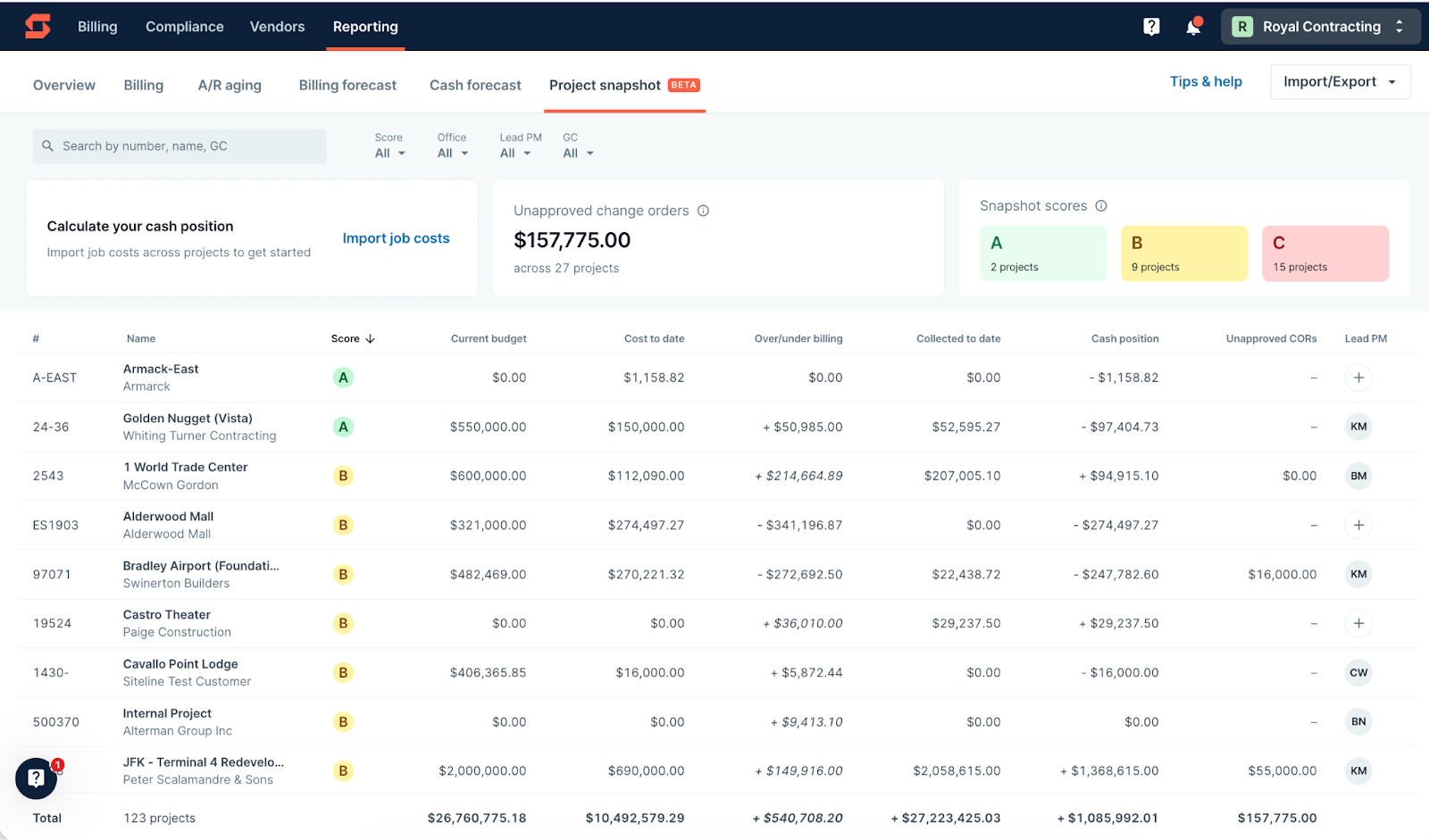
The goal is not to analyze everything every week. It’s to consistently surface the few projects that deserve attention before they turn into month-end surprises.
Final Thought
Change orders don’t sink projects. Lack of visibility does. And when change orders make up a meaningful share of contract value, visibility isn’t optional—it’s how finance teams stay ahead of cash flow, risk, and surprises.
The right tools can help surface these issues before they become problems, giving you a clear view of which projects need attention and what questions to ask next. If you're curious how Siteline is helping subcontractor finance teams tighten up their change order workflows, we'd be happy to walk you through it.
AIA®, G702®, and G703® are registered trademarks owned by The American Institute of Architects and ACD Operations, LLC. Siteline is not affiliated with The American Institute of Architects or ACD Operations, LLC. Users who wish to use Siteline’s software to assist in filling out AIA® forms must have or secure the AIA® forms. Siteline does not and will not provide users with the forms.


%202.webp)