.svg)
Key Takeaways
- Most subcontractor billing workflows grew organically rather than by design, creating hidden inefficiencies that process mapping can expose.
- Process mapping a subcontractor back office surfaces waste in billing, accounts receivable, and lien waiver workflows that would otherwise stay invisible.
- Unlike jobsite delays, back-office friction is discreet — someone stays late or sends another follow-up email, masking the true cost.
- Documenting each billing step from percent-complete submission to pay app delivery reveals where handoffs break down and where time is lost.
Ask a superintendent at a construction company how a slab is poured, and they'll walk you through every step: crew sequencing, pour order, QC checkpoints, documentation. They've mapped, timed, and perfected it. Ask that same company's controller how they get paid on a progress job, and you'll get something far less instructional or scientific. They’ll say something to the effect of: "The PMs send over percents complete, accounting puts together the pay app, and we send it to the client. Then we get paid after they get paid.” It’s an imprecise description of what happens, not an articulation of the true process.
Process mapping is one of the most-cited tools in lean construction. And yet, as this JELD-WEN article notes, it’s still not widely leveraged across the construction industry. The documented examples that do exist almost always cover GC and homebuilder operations—things like cycle time reduction, sales-to-construction handoffs, and options selection. Back-office workflows—billing, A/R, lien waiver collection, and month-end close—get almost no attention, even though they're full of the same kind of waste that lean teams spend years rooting out on the job site.
That's a gap worth closing. It’s time back office teams treat their billing processes the way a lean superintendent treats a slab pour: map it, find the friction, and fix what's broken.
Process Mapping in a Nutshell
Process mapping is the act of visually mapping a working process into defined steps to increase internal understanding of that process and provide a standard that can be improved upon. The output is a diagram showing the current state of a workflow, including all manual steps, decision points, approvals, and data transfers.
Process mapping is not a software project, consulting engagement, or months-long initiative. You could draft a basic process map for a billing workflow in a half-day with the right people in the room.
Process maps come in several formats. The most common for back-office work is a swimlane diagram (also called a cross-functional flowchart), which organizes steps by role across horizontal lanes. According to the Lean Construction Institute, swimlane diagrams work well for processes that involve handoffs from one team to another, which describes subcontractor billing exactly. For billing, this would mean lanes for:
- Project managers
- A/R or billing specialist
- Controller or other manager
- the GC or GC portal
The map makes those handoffs—and where they break down—visible.
Other map types include:
- basic flowcharts (good for simpler, single-person workflows)
- value stream maps (used in lean processes to identify where value is and isn't being created)
- SIPOC diagrams (useful for mapping the high-level boundaries between teams)
Why Subcontractor Back Offices Are Full of Unmapped Processes
The job site gets attention because delays and defects are visible. A missed pour window is obvious because the rework cycle shows up in the schedule. Back-office friction is more discreet—someone simply stays late or sends another follow-up email or reconfigures the spreadsheet.
Most subcontractor billing workflows grew out of whatever worked in the moment. One person built a spreadsheet to house SOV data and run calculations, and that became "how we do it." When that person left, the next person adjusted the process slightly, and so on. What you end up with is a workflow no one consciously built and definitely never optimized.
This is exactly the condition that process mapping is designed to address. The Lean Construction Institute's framework identifies the goal of any mapping exercise as standardization: capturing what's actually happening, then creating a version that the team can consistently follow, improve, and teach to new people. For most back offices, the current process and the intended one are two different things, and no one has effectively documented either.
The Benefits of Process Mapping for Back-Office Workflows
1. Visibility Into What's Actually Happening
Before you can improve a process, you have to see it. This sounds obvious, but most billing processes exist as a collection of individual habits rather than a shared, documented workflow. When you map it, deferring to the people who actually do the work, you almost always discover steps that no one else at the company knew were happening, like a manual export that runs every month or a spreadsheet that a PM maintains independently.
That visibility alone has value. It creates a shared understanding that enables cross-training, coverage, and process improvement.
2. Surfacing Waste
Lean thinking defines waste as any activity that consumes time or resources without adding value. In billing, waste shows up in predictable forms like:
- re-entering data that exists elsewhere,
- waiting for approvals that lack deadlines,
- chasing information across email threads, and
- correcting errors that a more structured process would prevent.
The process map makes waste visible in a way that remarking "we should probably fix our billing process" never will. When you draw out the steps and see that the SOV is entered once in the estimating, PM, or accounting tool, retyped into Excel for billing, and then retyped again into the GC portal, the waste isn’t a general feeling. It’s three discrete boxes on the map with the same data flowing through each.
3. A Foundation for Training and Redundancy
Most back offices have one person who really knows how billing works. When that person takes vacation, everything slows down or worse, stops altogether. When they leave, the process walks out the door with them.
A documented process map is the foundation for training new staff and building redundancy into workflows that currently live in someone's head. It’s not a replacement for expertise, but it is a prerequisite for transferring it. As the Lean Construction Institute notes, standardization is what makes it possible to implement improvements universally, and you can’t standardize what you have not documented.
4. Smarter Software Decisions
Construction technology decisions are often made based on feature lists and demos rather than on a clear understanding of which steps in a given workflow are causing pain. A process map changes that.
For billing specifically, when you can point to the three places where data gets re-entered, the two-week lag between project completion and lien waiver collection, or the step where change orders consistently get stranded, software evaluation becomes a much more targeted exercise. You’re no longer asking, "does this software look helpful?" Instead, you’re asking, "does this software eliminate steps 4, 7, and 11 on this process map?" Specific questions are always the better questions—we even put together a list of them to ask during software demos in our software selection guide.
5. A Baseline You Can Actually Measure Against
Improvement requires measurement. Without a documented current state, you have no way to know whether a process change made things faster or simply relocated the bottleneck. A process map gives you a baseline: here’s how many steps the process has, here’s where time is lost, and here’s where errors occur. After changes, you map it again and compare.
For billing, the metrics that matter include days from project data to pay app submission, pay app rejection rate, days from waiver request to waiver return, and time from billing cutoff to collections follow-up. A process map connects those numbers to specific workflow steps, so you know where to look when the numbers are bad.
How to Map Your Back-Office Billing Process
The Lean Construction Institute's (LCI) seven-step process mapping framework translates well to back-office workflows. Here’s how to run each one for a subcontractor billing process.
Step 1: Identify
Identify the process to map. For most subcontractors, the highest-pain workflow is the monthly progress billing cycle—the process that drives everything from cash timing to lien rights compliance. Start there. Resist the urge to map everything at once. One well-mapped process produces more usable output than a sprawling diagram that no one finishes or acts on.
The LCI framework notes that this step can come from a brainstorm—identifying multiple processes that lack standardization—or from a discussion that surfaces one critical process that needs attention. Either way, be specific. "How we do billing" is too broad; "how a pay app gets from SOV to GC portal submission" is mappable.
Step 2: Define
Define the process to determine which map type will work best. For billing, a swimlane diagram is almost always the right choice because the process has clear handoffs between roles: PM, A/R or billing specialist, controller or manager, and the client or its GC portal. Swimlane maps make those handoffs explicit and show where work gets stuck between lanes.
If you’re new to process mapping, draw it by hand on a whiteboard with sticky notes before moving to software. Lucidchart, Miro, and Visio all support swimlane diagrams if you want a digital version. You can also use AI tools like Mockflow or Mermaid Live Editor.
Step 3: List
Work with your team to list out all of the necessary steps in the process. Bring together everyone who touches billing: the person who collects data from PMs, the person who builds the pay app, the controller or manager who reviews it, and anyone who handles lien waivers and/or GC portal submissions as well as whoever tracks lien rights.
The LCI framework suggests working backwards from the end of the process, which helps surface steps that are easy to overlook and eliminates waste along the way. Ask:
- What triggers this step?
- Where does the information come from?
- What form does it take (email, spreadsheet, system export)?
- Who hands off to whom?
- What happens when something is missing?
Getting input from multiple people reduces the chance of missing steps. It also increases shared understanding of the process across the team.
Step 4: Map
Once the steps are confirmed, map the process visually.
- Draw one swimlane per role.
- Plot each step as a box in the appropriate lane.
- Connect them with arrows showing sequence.
- Mark decision points (does the controller approve before submission? Is there a review step for change orders?) with a diamond.
- Mark handoffs between lanes clearly.
As the LCI framework notes, mapping often surfaces variables or steps that did not come up during the listing stage. When the draft is on the board, look for two things: (1) any step where the same data appears more than once, and (2) any place where an arrow crosses multiple lanes without a clear handoff mechanism.
Step 5: Gather Feedback
Walk through the map with each person who contributed. Ask:
- Is this accurate?
- Are there steps we missed?
- Is there a step that works differently for certain projects or with certain clients?
This step surfaces the edge cases and exceptions that don't make it into the first draft—things like the GC whose portal requires a different pay app form than the standard template, the billing cutoff that shifts by a week every quarter, or the approval step that only happens on projects above a certain dollar threshold. Gathering honest feedback prevents the standardized version from being built on an incomplete picture.
Step 6: Implement
Once you’ve documented and validated the current state, outline a revised state that eliminates the clearest waste: data re-entry, manual lookups, undocumented exceptions, etc. Assign ownership to each step and define what triggers each handoff. This serves as the bridge between what you mapped and what you want to standardize.
Once you envision it, bring it to life. Document the new process, communicate it to everyone who touches billing, and make sure each person understands their revised role. The map is not the output; the standardized workflow is.
Step 7: Improve
Do not allow the process to go stale. Schedule a review 60 to 90 days after rollout. Ask:
- Are people following the new process?
- Where are workarounds emerging?
- What new friction has appeared?
The LCI framework recommends creating a forum where team members can regularly share feedback and discuss how to improve the process. Process improvement is iterative; the first version of the map is not the final one.
What a Monthly Billing Process Map Surfaces
Here is a realistic set of findings from mapping a typical subcontractor pay app workflow. These are not edge cases. They show up regularly when accounting teams work through this exercise for the first time.
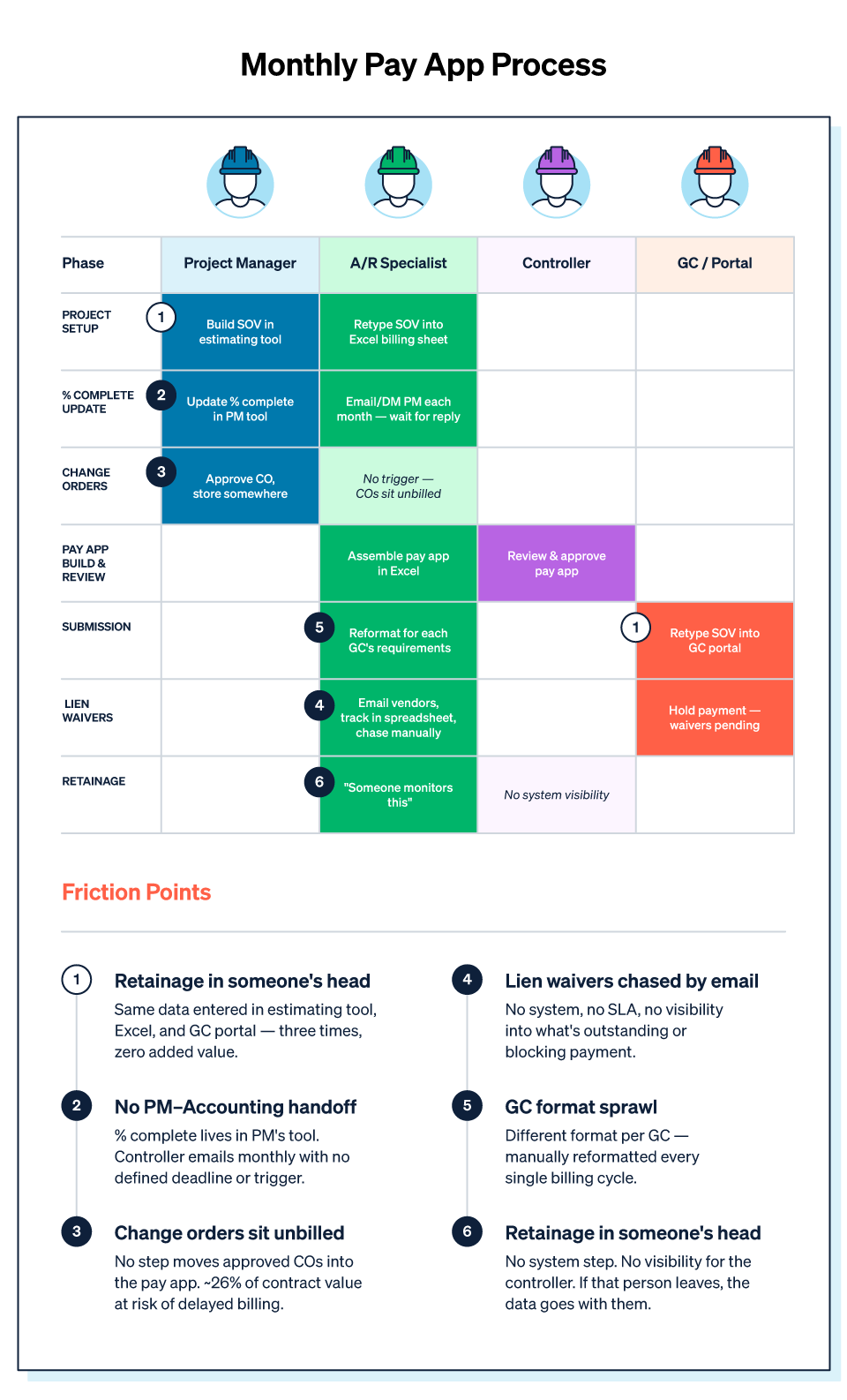
Finding 1: The SOV is entered three times.
The schedule of values and project data are established in the ERP or accounting system. Then it’s retyped into Excel to build the billing spreadsheet. Then it’s retyped again into each GC's portal at submission. That is three entries of the same data; each one a potential source of error and none of them adding value.
On a map, this looks like three identical data boxes in different swimlanes with no connection between them. The fix—a system that carries the SOV forward from first entry—is obvious once you can see it.
Finding 2: Percent-complete data lives in the PM's head (or tool)
The PM updates percent complete in a project management tool that does not communicate with the accounting system. The controller or A/R specialist messages the PM every month for the numbers. The PM responds when they have time, which is not always before billing cutoff.
This is a handoff with no defined mechanism. It works when it works, and when it does not, the pay app is late. On the map, we’d see an arrow crossing from the accounting lane to the PM lane with no system or standard behind it.
Finding 3: Change orders sit unbilled.
Change orders are approved and stored somewhere, but no one owns the step of rolling them into the pay app. The PM assumes billing will pick them up. Billing assumes the PM will flag them. They end up sitting until someone notices.
According to Siteline’s own data analysis, change orders represent approximately 26% of total contract value in commercial construction; leaving them out of billing means leaving significant revenue on the table, often for months at a time. On the map, this shows as a missing trigger: no step that moves an approved change order into the billing workflow.
Finding 4: Lien waivers are chased by email.
Lower-tier lien waivers are collected via email, tracked in a spreadsheet, and manually chased when reminders don’t get a response. The person managing this process typically has no visibility into which waivers have been requested, which have been returned, and which are holding up payment.
This is one of the most time-consuming steps in the billing workflow and one of the easiest to overlook because it happens after the pay app goes out. On the map, it typically sits in the A/R lane with no connection to any system and no defined expectation.
Finding 5: Every GC has a different submission format.
Some GCs use Textura. Others use GCPay. Some want a PDF. Others want an Excel file with a specific tab structure. The person responsible for submissions has to account for each client’s requirements each month and reformat pay apps accordingly.
This is invisible overhead that compounds across a large portfolio. On the map, it shows as a branching decision point at the submission step, with a different path for each GC format, which visualizes redundancy in a way that "it's just a little extra work" does not.
Finding 6: Retainage tracking lives in someone's head.
There isn’t a step to track retainage balances by project, so nothing flags when retention billing is due. One person knows which projects have retainage held and roughly when it should be released. If that person is out, the information is inaccessible. If that person leaves, it’s gone.
On the map, this is a gap, a blank space where a step should be, marked only by "someone monitors this."
The Friction That Won't Go Away Without the Right Tools
Process mapping surfaces waste, and standardization removes a good portion of it. But some billing friction is structural, persisting regardless of how well the process is documented, because it stems from limitations that documentation alone cannot fix.
For example, the three-entry SOV problem doesn’t go away if the tool that builds the pay app does not connect to the tool that stores the SOV. The GC portal problem doesn’t go away if the billing team still has to log into different systems to submit it. Lien waiver collection doesn’t get faster if the mechanism for requesting, tracking, and reminding is still email and a spreadsheet.
Billing-specific friction—e.g., GC portals, lien waiver collection, SOV reuse, change order tracking, lower-tier compliance—is exactly what Siteline is built to take off the map. It connects to your accounting system so SOV data flows forward without re-entry. It integrates with GC payment portals so pay apps automatically submit to the correct portal without reformatting. It handles lien waiver requests, reminders, and e-signature collection in one place, with AI validation that catches errors before they hold up payment. To see what the billing workflow looks like after the friction is removed, check out Siteline.
Frequently Asked Questions
What are the benefits of process mapping for a back-office workflow?
Process mapping benefits back-office teams by making hidden waste visible, standardizing workflows that have evolved informally, creating a foundation for training and cross-coverage, enabling more targeted software decisions, and establishing a measurable baseline for improvement. In billing specifically, mapping typically surfaces instances of data re-entry, undefined handoffs between PMs and accounting, and steps with no system support, all of which are fixable once they’re visible.
How do I map a business process?
The Lean Construction Institute's seven-step framework covers: (1) Identify a process that needs standardization; (2) Define which map type fits best; (3) List every step with the people who do the work; (4) Map it visually; (5) Gather feedback from participants; (6) Implement a standardized version with assigned ownership; and (7) Improve it over time through regular review. For back-office billing, a swimlane diagram is the right format and a half-day session is enough to produce a useful first draft.
How can I improve my billing process?
Start by documenting the current state through process mapping. Look for data re-entry (the same information entered in multiple systems), undefined handoffs between PMs and accounting, steps with no clear owner (especially change order billing and retainage tracking), and manual workarounds for GC portal submissions and lien waiver collection. Standardize the workflow, assign step ownership, and evaluate whether software gaps are forcing manual workarounds that process design alone cannot eliminate.
How do you find waste in a billing process?
Map each step in the current workflow and look for data entered more than once in different systems, wait time with no defined trigger or deadline, steps that depend on one person's knowledge with no backup, manual reformatting or file conversion, and exception-handling that has become routine. In subcontractor billing, the most common waste points are triple-entry SOVs, PM-to-accounting handoffs with no defined mechanism, untracked change orders, and manual lien waiver collection.
What is a swimlane diagram, and when should I use it?
A swimlane diagram (or cross-functional flowchart) organizes workflow steps into horizontal lanes by role. According to the Lean Construction Institute, it is the right format for processes that involve handoffs between teams. For subcontractor billing, swimlane diagrams make visible which role owns each step and where work gets stuck at the boundaries between finance, project management, and the client. Most diagramming tools—like Lucidchart, Miro, Visio, and even PowerPoint—support swimlane formats.
How long does it take to map a back-office process?
You can draft a basic process map for a single back-office workflow, such as the monthly progress billing cycle, in a half-day with the right people in the room. But budget time for a follow-up session to validate the draft and surface exceptions. Full standardization and rollout typically takes one to four weeks depending on how many workflow changes are required.
How does process mapping relate to software evaluation?
Process mapping makes software evaluation more precise. Instead of assessing whether a tool "looks helpful," a mapped workflow lets you identify the specific steps that cause the most friction and evaluate whether a given tool eliminates them. For back-office billing, specific questions could include:
- Does the tool carry SOV data forward without re-entry?
- Does it integrate with the portals our clients require?
- Does it handle lien waiver collection and tracking?
- Does it integrate with our ERP or accounting system?
AIA®, G702®, and G703® are registered trademarks owned by The American Institute of Architects and ACD Operations, LLC. Siteline is not affiliated with The American Institute of Architects or ACD Operations, LLC. Users who wish to use Siteline’s software to assist in filling out AIA® forms must have or secure the AIA® forms. Siteline does not and will not provide users with the forms.


%202.webp)