Key Takeaways
- AI can help construction subcontractors identify cash flow risks by analyzing A/R aging reports, WIP schedules, retainage balances, and change order logs.
- Subcontractors can use AI to identify slowing GC payments, unbilled change orders, overdue retainage, and billing delays.
- AI can help build and stress-test 13-week cash flow forecasts using actual GC payment history rather than contractual payment terms.
- For reliable and secure AI-assisted financial analysis, use company-approved tools, anonymize financial data, and verify outputs against source reports.
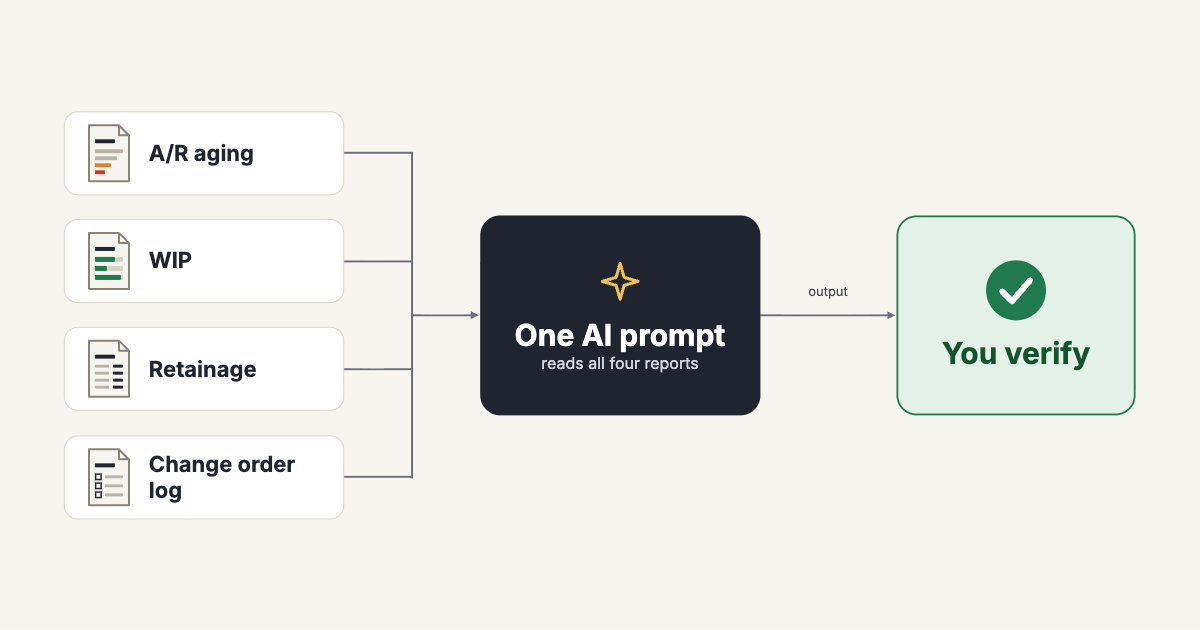
Revenue is up, but cash feels tighter than it did last year. If you're a controller at a commercial subcontractor, you've probably had that conversation with your CEO, and the honest answer was "let me look into it." The clues are usually already in your A/R aging, WIP schedule, retainage report, and change order log, but nobody has time to read all four side by side every month. AI can help, but you need to know what you’re asking for (i.e., a strong prompt), have clean data, and check what it returns.
Most construction AI prompts online are meant for use with emails, project briefs, and schedules. These 14 use your finance data instead, and each one tells you how to verify the answer, so you know where AI's job ends and yours begins.
Which AI prompts should subcontractors use to spot cash flow problems?
Here are the prompts, grouped by the question each one answers. One rule before you start: run them only in an AI tool your company has approved, and swap company, GC, vendor, and project names for codes. Scroll to the safety section later in the article to get into the details.
1. Why Cash Feels Tight
Run this one firs—before you paste any data—if you’re struggling to pinpoint the source of a cash crunch. You’ll describe the symptom(s), and the AI lists likely causes, such as slow-paying GCs, retainage held past closeout, unbilled change orders, or underbilled jobs. It also can help you narrow down which reports warrant a closer look.
Prompt: I'm the controller at a commercial [trade] subcontractor. Revenue is up this year, but cash feels tighter than it did last year. Walk me through the most likely causes for a subcontractor in this situation. For each one, tell me which report or number I should pull to confirm or rule it out.
Check it: Since AI hasn't seen your financial data yet, treat its response as a starting point for your investigation rather than a diagnosis.
2. GC Payment Drift
Slow payment can creep in gradually enough that the change goes unnoticed in your monthly A/R review. Using this prompt to compare recent payment times against historical averages can help you identify which customers are becoming a greater cash flow risk.
Prompt: Below are 12 months of paid pay apps, with GC names replaced by codes. Columns include GC code, project code, submission date, contractual due date, payment date, and amount. Compare each GC's average days to pay over the last three months with the preceding nine months. Flag any GC whose average payment time has increased by more than 10 days.
Check it: Manually calculate days to pay for several pay apps from a flagged GC to verify the findings.
3. A/R Aging Concentration
As we noted in our guide to prioritizing your A/R aging report, the age of an outstanding balance is only one factor in determining its risk to your business. This prompt can help you understand how much of your receivables are tied up with individual GCs can help you prioritize collections and assess your exposure to particular customers.
Prompt: Here are my current and prior-month A/R aging reports, organized by GC code and aging bucket, with retainage listed separately. Our average monthly billings are $[X]. Calculate the percentage of total A/R concentrated among my three largest outstanding GC balances. Identify balances that have moved into older aging buckets and recommend which three accounts I should prioritize for collections this week, explaining why.
Check it: Verify the top three’s sums in your spreadsheet and weigh the recommended collection priorities against what you know about each account.
4. GC Payment-Weighted Scoring
A GC that consistently pays in 25 days at a 12% margin may be a better customer than one that takes 75 days to pay at an 18% margin. Factoring financing costs into profitability gives you a more complete picture of which GCs are worth pursuing.
Prompt: Here are 12 months of data by GC code: total billed, average days to pay, current A/R by aging bucket, average days to approve change orders, and gross margin on completed jobs. Score each GC from 1 to 5 on payment speed, payment consistency, and change order approval time. Estimate how financing costs affect each GC's gross margin using an annual financing rate of [8]%. Explain your scoring methodology and financing assumptions, then identify which GCs warrant closer scrutiny on future bids.
Check it: Verify the financing cost for one GC: job value x annual rate x days waited ÷ 365. Use the rankings to inform bid decisions rather than dictate them.
Which AI prompts help you find cash stuck in retainage, WIP, and change orders?
5. Retainage Buildup
On a $2 million contract with 10% retainage, you could have $200,000 tied up even after your work is complete. Regularly reviewing retainage balances alongside project completion and closeout status can help you identify collection opportunities.
Prompt: Here are retainage receivables by project, including contract value, percent complete, retainage rate, amount held, substantial completion date, and whether closeout documents have been submitted. Flag projects that are substantially complete with retainage outstanding for more than [60] days, and projects where retainage held is more than our estimated job profit. Identify which balances may be collectible within the next 90 days and what could prevent their release.
Check it: Confirm collection estimates against each subcontract's retainage release terms, applicable state laws, and outstanding closeout requirements.
6. Under- and Overbilling
While underbilling strains cash flow by leaving you to finance work you've already performed, overbilling can create a false sense of financial security if you spend cash earmarked for future work. Regularly reviewing your WIP schedule helps you identify both imbalances and better understand your true cash position.
Prompt: Here's my WIP schedule. Identify jobs that are underbilled by more than $[X] or [Y]% of contract value as well as any overbilled jobs. For each underbilled job, recommend potential causes to investigate (e.g., unbilled change orders, stored materials, SOV structure), but don't assume which one is the cause.
Check it: Reconcile the results against your ERP's WIP report and confirm that estimated costs to complete are current. For more, read how to use WIP data to improve project profitability.
7. Unbilled and Stalled Change Orders
Siteline's analysis of 2025 customer contract data found that change orders account for roughly 26% of total contract value. With that much revenue at stake, tracking both outstanding approvals and whether approved work has actually been billed is essential.
Prompt: Here's my change order log, including change order (CO) number, project code, status, date submitted, date approved, amount, and amount billed to date. Identify approved COs that haven't been billed and pending COs older than 30 days. Total each category by project and identify which GCs take the longest to approve change orders.
Check it: Confirm approval status against signed documentation and reconcile unbilled amounts against your billing records.
Which AI prompts identify billing delays that slow construction cash flow?
8. Billing Lag
Every day between the end of a billing period and pay app submission can extend the time your business finances the work. Measuring that gap with this prompt can reveal opportunities to shorten your billing cycle.
Prompt: Here's a list of pay apps with project code, office code, project type, billing period end date, and date submitted to the GC. Calculate the number of days between period end and submission for each pay app. Show the average and range by office and by project type, and flag projects where submission took more than [10] days after the period ended. Don't rank or evaluate individual employees.
Check it: Verify submission dates from the past three pay apps, and investigate whether delays stem from internal processes or GC-specific billing requirements.
9. Pay App Revisions and Rejections
Missing backup, incorrect values, missing waivers, and wrong forms all slow payment. Using this prompt to identify the most common reasons for pay app rejection or rework can help you determine where changes to your billing process would have the greatest impact.
Prompt: Here's my pay app log, including GC code, project code, date first submitted, number of revisions or rejections, reason for each (or “unknown”), and date paid. Group revision reasons into categories (e.g., missing backup, wrong amounts, missing waivers, and wrong forms) and identify the most common causes of resubmission? Compare average days to pay for revised and unrevised pay apps, and identify which GCs have the highest rejection rates. Flag any limitations in the data.
Check it: Review a sample of categorized revisions for accuracy. Differences in payment times may reflect factors beyond the revisions themselves.
10. Waiver and Compliance Holdups
Missing lien waivers and expired compliance documents can hold up an otherwise complete pay app. This prompt helps you scan for any compliance-related holds, and prioritize them by how long they’ve been unresolved.
Prompt: Here's a status log for the current billing period. Columns include project code, vendor code, document type (e.g., conditional progress, unconditional final), through date, amount, date requested, date received, and status. I’ve also included compliance documents with expiration dates. Identify which pay apps are held up by missing or expired documents or discrepancies in through dates or amounts. Group the results by what each pay app is waiting on, listing the oldest outstanding requests first. Don't draft, fill in, or edit any lien waivers.
Check it: The AI can flag mismatches, but a person must review and approve every waiver and correct any errors. And because forms and requirements vary by state, an AI-generated waiver might look correct without meeting statutory requirements..
How do you forecast a construction cash flow gap before it hits payroll?
11. 13-Week Cash Gap
Contract terms tell you when a GC should pay, whereas payment history tells you when they actually do. This prompt builds a 13-week forecast from each GC’s actual days to pay and flags weeks below your minimum cash, providing you with a more realistic basis for planning around upcoming expenses.
Prompt: Build a 13-week cash flow forecast using each GC's actual average days to pay from the receipts attached, rather than contractual payment terms, to project cash inflows. For outflows, account for payroll of $[X] every [week/two weeks], supplier payments, equipment, and line-of-credit payments. Start with $[X] cash on hand. Show ending cash by week, flag any week below $[minimum], and tell me which receivables would need to come in earlier to cover the gap. Then rerun the forecast assuming my biggest GC pays [X] days slower than usual.
Check it: Verify that your starting cash matches your actual bank balance, and use rounded payroll totals rather than employee-level records. Review which receivables the AI identifies as needing earlier payment, as these can help inform your collection priorities.
12. GC Payment Conversation Prep
Say a GC owes you money across several pay apps, and the oldest is 45 days past due. Before you call their PM, you want to know what to ask, what to document, and what you can offer without souring the relationship. Preparing those details beforehand can help you secure a more concrete commitment.
Prompt: A GC owes us $[X] across [number] pay apps. The oldest is [X] days past due, and the GC has paid an average of [X] days late over the past year. Help me prepare for a conversation about the outstanding balance. Recommend questions to ask, what to document, and what options I can offer or request to preserve our cash position without damaging the relationship.
Check it: Make sure any proposed arrangements align with your subcontract, collections policy, and authority to negotiate payment terms.
13. Recurring Monthly Cash Review
The first twelve prompts are great for helping you find problems. This one is great for turning these analyses into a monthly financial review to help you catch problems before they escalate.
Prompt: Create a 30-minute monthly cash flow review for a commercial subcontractor's finance team. Include which reports to pull, the questions to ask of each one, and the warning signs that should trigger action.
Check it: Tailor the agenda and warning thresholds to your company's financial goals, reporting capabilities, and risk tolerance.
14. Plain-English Summaries for Leadership
Your leadership team needs to understand how financial trends affect the business and what decisions may be required. AI can help translate detailed accounting findings into a concise update that supports those conversations.
Prompt: Below are my findings from this month's cash review, with GC, vendor, and project names replaced by codes. Write a cash flow update for our [CEO/owner] in plain English. Explain the three biggest risks to cash over the next 90 days, what's driving each one, potential actions, and what I still need to verify. Keep the summary under 300 words.
Check it: Verify every financial claim against its source report before sharing the summary with leadership. It’s always a good idea to have someone other than you do this part, too. And if your policy requires disclosing AI-assisted work, note it on the summary.
How to use AI prompts safely and effectively
Before running the prompts below, make sure you're using a company-approved AI tool that's authorized to handle financial data. Replace company, GC, vendor, and project names with codes, and never upload bank details, login credentials, or employee-level payroll records.
To improve the accuracy of your results:
- Clean your data. Use consistent date formats, clearly labeled columns, and one row per record.
- Ask AI to show its work. Have it identify the source rows and calculations behind its findings.
- Identify gaps in the analysis. Ask AI what it can't determine from the data provided.
- Verify the results. Cross-check findings against your ERP or source reports before acting on them.
Remember that AI can help identify financial risks, but it's up to your team to determine how to address them. Keep financial decisions, document approvals, customer communications, and employee evaluations in human hands.
For more guidance on establishing safeguards, read our guide to writing an AI policy for subcontractors or download our AI Policy Checklist.
How can subcontractors streamline cash flow analysis?
While these AI prompts can help you uncover cash flow risks, the quality of the analysis depends on the data you provide. If your pay apps, change orders, waivers, and collections live in different systems, you’re still spending time exporting, consolidating, and formatting that information.
Siteline works alongside your ERP to centralize your billing and collections data, making much of this analysis possible without the manual legwork. For example:
- The Time to Payment Dashboard shows average days to pay by customer, PM, or office,
- While Project Snapshot flags aging change orders and
- The A/R Aging report lets you drill into the pay apps behind each balance.
These are just a few of the reports Siteline gives subs to help them identify and address cash flow risks.
Across nearly $14B in tracked receivables, Siteline customers get paid in an average of 55 days from pay app submission, compared to the industry average of 90-plus days. If you’d like to see how that looks with your own numbers, schedule a demo.
FAQ
Can AI analyze construction accounting data?
Yes, if you give it a clean export and a specific question. General AI assistants can compare columns, total balances, and flag changes between two reports, which covers most of the prompts above. They can't see your ERP, contracts, or history with a GC, so you supply that context and verify the output.
Is it safe to put A/R aging reports into ChatGPT or Claude?
Only through a tool your company has approved, with company, GC, vendor, and project names replaced by codes. A/R aging, WIP schedules, and change order logs shouldn’t go in personal accounts or unapproved tools. Never enter bank details, Social Security numbers, passwords, or employee-level payroll records into a general-purpose AI tool, either. When in doubt, ask your policy owner before you upload anything.
What's a normal payment time for subcontractors?
Siteline's research puts it at about 96 days from invoice submission to payment received, and only 5% of subcontractors report getting paid on time. Your own number matters more. Calculate average days to pay by GC, then compare it to the 96-day benchmark and to your contract terms.
How often should I run these prompts?
Run the monthly cash review prompt alongside your WIP close. Check pending change orders and your largest GCs' aging weekly on active jobs. Siteline's change order KPI guidance recommends finance teams track pending change order dollars weekly on active jobs and monthly during WIP.
Can I use these prompts to evaluate my PMs or billing staff?
No. Some AI policies bar AI from influencing hiring, discipline, compensation, or performance decisions. Use outputs like billing lag and revision reasons to fix processes by office or project type, and keep decisions about people with managers.
Disclaimer: This post is general information, not legal advice. Have counsel review your AI policy before you roll it out.
AIA®, G702®, and G703® are registered trademarks owned by The American Institute of Architects and ACD Operations, LLC. Siteline is not affiliated with The American Institute of Architects or ACD Operations, LLC. Users who wish to use Siteline’s software to assist in filling out AIA® forms must have or secure the AIA® forms. Siteline does not and will not provide users with the forms.